Select Version of EA Desktop:
The Fees tab of the Related Records area provides an auto-calculation tool to populate license fees. The price used for calculating the fees must pre-set in the Seismic module. Be sure to sync the seismic survey with the license to ensure the license obtains the current pricing.
 To sync the seismic survey...
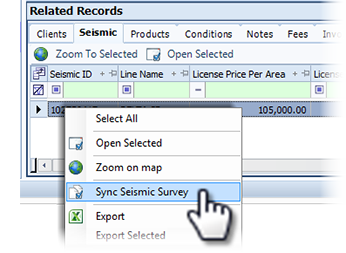
In the Related Records area of the License module, open the Seismic tab. Right-click on the seismic record and select Sync Seismic Survey. All license-related columns for the survey update to the current information.
To populate fee, click Populate Fees . The values for the related columns in the Fees tab automatically display.
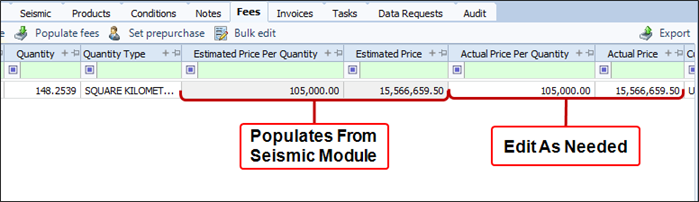
The Estimated Price Per Quantity column populates the price as set from the Seismic module. The quantity multiplied by the price displays in the Estimated Price column. The estimated values replicate to populate the Actual Price Per Quantity and the Actual Price. The actual values are open for editing as required.